

Network Stream
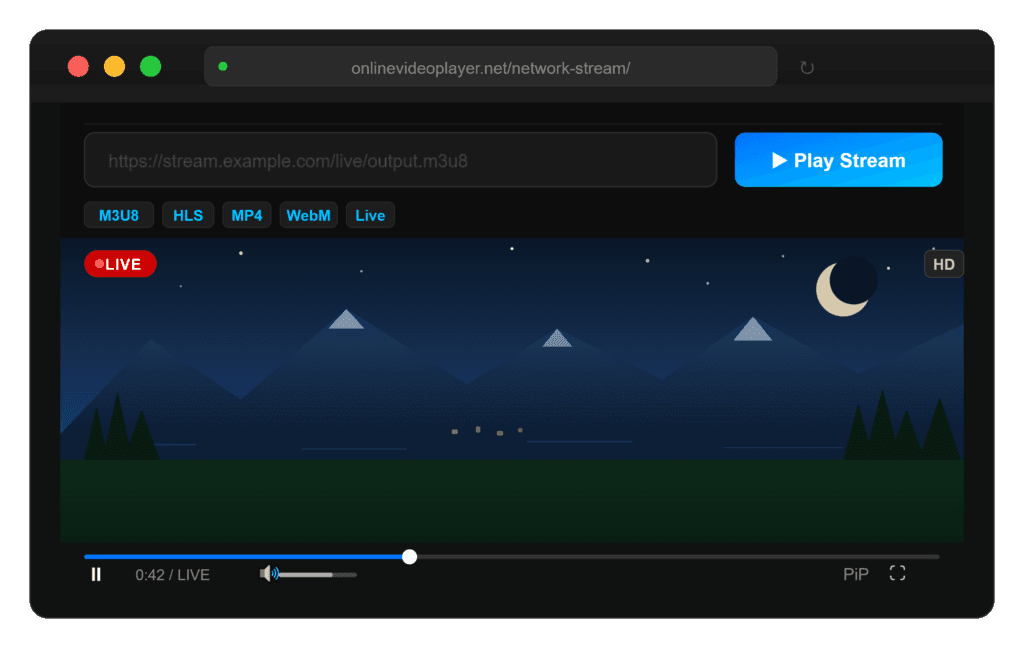
Stream and watch video directly from any URL using our free Network Stream Player. Supports live streams, M3U8, HLS, MP4, WebM, and more. No downloads, no installs, no sign-up – just paste your stream link and play instantly in your browser.
What Is a Network Stream Player?
A network stream player is a browser-based tool that lets you play video content directly from a URL — no download, no install, no sign-up. You paste a link, hit Play, and the video plays instantly in your browser. Unlike a media player installed on your computer (like VLC or MX Player), a network stream player runs entirely online and works on any device.
Our Network Stream Video Player on this page supports HLS streams, M3U8 playlists, live video feeds, MP4, WebM, MKV, and more. It uses HLS.js for adaptive live stream playback and Plyr for a polished, accessible video player interface.
Supported Stream Formats
This player handles virtually any video stream format accessible via a direct URL:
- M3U8 / HLS — the most common live streaming format used by broadcasters, sports channels, and IPTV providers
- MP4 — universal video format, works with any direct MP4 link
- WebM — Google’s open video format, natively supported in Chrome and Firefox
- MKV — high-quality container format, playable via direct URL
- OGG / OGV — open-source video, fully supported in modern browsers
- Live streams — any live broadcast URL ending in .m3u8 or served via HLS protocol
How to Use the Network Stream Player
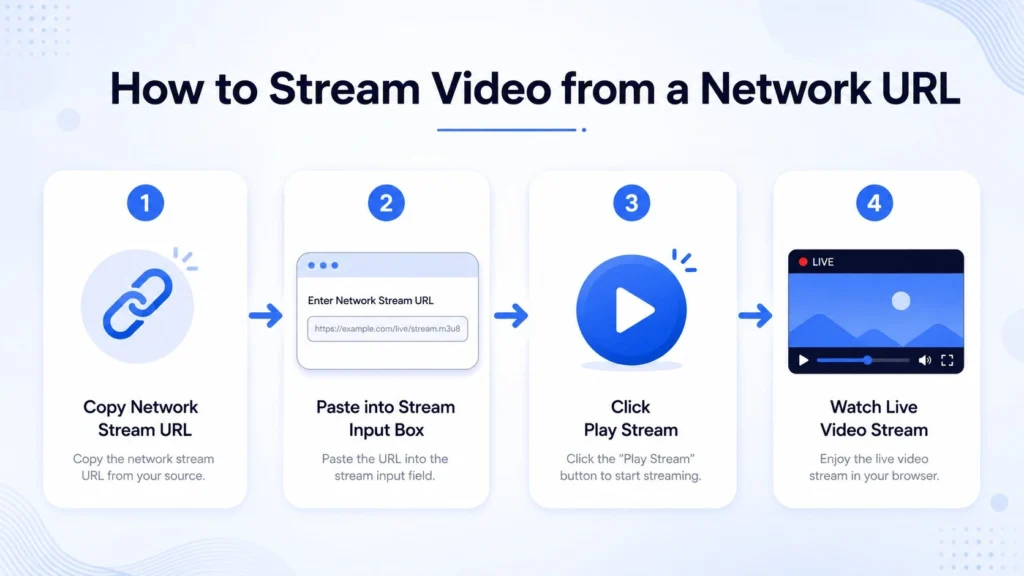
- Get your stream URL. This is the direct URL to the video — for example, a link ending in
.m3u8,.mp4, or.webm. Live streams from IPTV providers or broadcast platforms usually come in M3U8 format. - Paste it into the input field above and click Play Stream (or press Enter).
- The player auto-detects the format. HLS and M3U8 streams are handled by HLS.js for smooth adaptive bitrate playback. Direct video files play natively in the Plyr player.
- Use the player controls — play/pause, volume, fullscreen, picture-in-picture, and playback speed are all available.
Network Stream Player vs. IPTV Stream Player — What’s the Difference?
This is a common question. Here’s a clear breakdown:
| Feature | Network Stream Player | IPTV Stream Player |
|---|---|---|
| Primary use | Play any single video URL (MP4, M3U8, HLS, live) | Load M3U playlist files with multiple channels |
| Input | A single stream URL | An M3U/M3U8 playlist file or URL with 10s–1000s of channels |
| Channel switching | No — one stream at a time | Yes — browse and switch channels |
| EPG (TV Guide) | No | Often included |
| Best for | Streaming a specific live event, movie, or video from a URL | Watching IPTV subscriptions with many channels |
Bottom line: Use this Network Stream Player when you have a specific URL you want to play. An IPTV player is a separate, more complex tool for managing and browsing large channel playlists — we may add that as a dedicated tool in the future.
Common Use Cases
- Watch live sports streams — paste the M3U8 URL from a broadcaster and watch live
- Test your own video stream — developers can verify their streaming endpoint works correctly
- Play online video without downloading — stream any MP4 or WebM file from a direct link
- Verify IPTV channel links — test individual M3U8 channel URLs before importing them to a full IPTV app
- Stream conference recordings, webinars, or events — any direct video link plays instantly
- Play HLS adaptive streams — the player automatically selects the best quality for your connection
Network Stream Video Player
How to Use the Network Stream Video Player on Your Website
We know that watching videos from the internet is an everyday activity. Whether you’re streaming a live event, watching a movie, or just enjoying media, you need a reliable way to access video content directly from URLs. That’s where our Network Stream Video Player comes in!
If you’re looking for a quick and easy way to stream videos from a URL without the need for downloads or complex setups, this tool is just what you need. Our Network Stream Player will help you stream your favorite videos directly on your browser.
What is a Network Stream Video Player?
A Network Stream Video Player is a tool that allows you to play video content directly from a URL. It works similarly to well-known players like MX Player or VLC but embedded on our website. By simply entering a video stream URL, you can play videos from online sources without needing to download them.
With our Network Stream Video Player, you can easily watch live or recorded content hosted anywhere online. Whether it’s an MP4 file or a live video feed, this tool supports it. All you need is the download link of the content.
Key Features of the Network Stream Player:
- Simple Interface: The video player is easy to use. Just enter the stream URL, hit “Play”, and you’re good to go!
- Supports Multiple Video Formats: It works with various video formats like MP4, WebM, and more.
- Responsive Design: The player automatically adjusts to fit your screen, whether you’re on a desktop, tablet, or mobile device.
- Customizable: You can integrate it seamlessly into your existing website without worrying about disrupting the look and feel of your design.
How to Use the Network Stream Video Player:
Using the Network Stream Video Player is easy. Follow these steps to get started:
- Go to the Network Stream Page: Visit our Network Stream Player page to access the tool.
- Enter the Video URL: In the provided input box, paste the URL of the video you wish to stream. Make sure the link is valid and points directly to the video stream.
- Click “Play”: Once you’ve entered the URL, click the “Play” button. The player will load and start streaming the video directly from the source.
- Enjoy Your Video: The video will now be displayed and can be played directly from the URL.
Why Use the Network Stream Player?
If you’re someone who watches video on the web, this tool eliminates the need to download or redirect visitors to external sites. It allows you to embed and stream video content directly on our site.
Some common use cases include:
- Stream live events: If you have a streaming link, whether it’s a webinar, concert, or sporting event, you can stream and watch live video from our site.
- Watch videos without downloading: This tool lets you stream video content directly from any streamable URL on our site without downloading any resources.
Conclusion
Network Stream Video Player is a powerful and easy-to-use tool that lets you stream video content directly from URLs. This tool can enhance your viewing experience. Try it today and enjoy seamless streaming right on our website!
Frequently Asked Questions
What is a network stream URL?
A network stream URL is a direct web address pointing to a video file or live stream that can be played over the internet. Common examples include links ending in .m3u8 (HLS/live streams), .mp4 (video files), or .webm. You can usually get these links from streaming services, broadcast platforms, or IPTV providers.
How do I play an M3U8 link online?
Paste your .m3u8 URL into the input field at the top of this page and click Play Stream. Our player automatically uses HLS.js to handle the adaptive stream and begin playback — no extra software needed.
Why is my stream not playing?
The most common reasons a stream won’t play are: the URL has expired or is no longer live, the stream server has CORS restrictions that block cross-origin browser requests, or the format isn’t a standard streamable format. Try opening the URL directly in your browser first to check if it’s accessible.
Does this work on mobile?
Yes. The player is fully responsive and works on Android and iOS browsers. On Safari (iOS/macOS), native HLS is used, which is natively supported by Apple devices.
Is this player free?
Completely free. No account, no download, no paywall. Just paste your stream URL and play.
Can I use this to test my own HLS server?
Yes — developers and broadcasters commonly use this tool to verify their streaming endpoints. Paste your HLS manifest URL (e.g. https://yourdomain.com/stream/output.m3u8) and click Play to confirm it’s working.
What’s the difference between M3U and M3U8?
M3U is a plain text playlist format. M3U8 is the same format encoded in UTF-8, and it’s the standard used for HLS (HTTP Live Streaming) — the protocol used by Apple, YouTube, Twitch, and most modern streaming platforms for adaptive bitrate streaming.
About This Tool
This Network Stream Video Player is built and maintained by the team at OnlineVideoPlayer.net — a free, ad-supported suite of online video tools. We’ve been building browser-based media tools since 2024, and our goal is to give anyone with a video URL a fast, reliable way to play it — without installing anything.
The player is built on two trusted open-source libraries:
- HLS.js — the industry-standard JavaScript library for HLS stream playback
- Plyr — a lightweight, accessible, customizable HTML5 media player
Disclaimer: OnlineVideoPlayer.net is an independent tool and is not affiliated with, endorsed by, or connected to any streaming service or content provider. This tool does not host, store, download, or modify any video content. It simply plays video streams directly from the URLs provided by the user. Users are solely responsible for ensuring they have the right to access and stream the content from any URL they enter. All video content, trademarks, and rights belong to their respective owners.